Loading a lot’s history from a photo, with an AI agent
How a lettuce lot that was already in Growcast got its history back, from germination to the vegetative stage, from a handwritten sheet and an AI agent connected to the platform’s MCP server.
In a leafy crop like lettuce, the history is short but it matters: when it germinated, when it was thinned, when it went into the system and which nutrient solution it received each week. While that record lives in a notebook it works for day-to-day use, but not to audit a lot or to read it next to the room’s variables.
This is the case of an account that already used Growcast. Sala hidro had its temperature, humidity, CO₂ and VPD sensors recording from before, and lot Lechuga SH-0109, 24 butterhead lettuce plants, had been created at sowing, on 1/9. What was missing was its history: the stages since germination and the tasks, written down on a sheet. It was entered from a photo, with an AI agent connected to the account through Growcast’s MCP server.
Growcast’s MCP server
MCP (Model Context Protocol) is the standard with which an application opens its data and its actions to an AI agent. Growcast exposes its own MCP server, so an agent such as Claude, ChatGPT or Gemini can be connected to an account and worked with by talking to it: it answers with the rooms’ real data and records the work in the platform.
The agent reads the same things the app shows: rooms, variables with their current value and their history, lots, cycles, tasks, supplies, panels, metrics and the user manual. And it writes the day’s work: it creates and completes tasks, creates and operates lots, starts and closes cycles, creates alarms, commands outputs and applies automations. It also loads the past: stages and tasks with their real dates, so the history does not start on the day the agent was connected. It deletes nothing and does not manage users, and actions on the hardware are flagged so the agent asks for confirmation before running them.
Connecting an agent
There is a single address, the same for every platform, and it is the only thing to copy. There is no client ID or password: the agent opens the Growcast sign-in and access is authorized from there. The app’s user manual has the steps for each platform.
Connect the assistant
There is a single address, the same for every platform, and it is the only thing you have to copy. There is no client ID or password to fill in: the assistant opens the Growcast sign-in and you authorize access from there.
- 1
Open Claude in the browser or in the desktop app and go to Settings > Connectors.
- 2
Press Add custom connector.
- 3
Paste this address and leave the client ID and secret empty.
- 4
Confirm: Claude opens the Growcast sign-in. Sign in with the account the assistant will use and authorize access.
The agent works with the role of the account it connected with and on its active organization: if that account cannot create a lot, neither can the agent. The manual recommends giving it its own account, invited with the minimum role it needs, so that Activity, the tasks and every record show what the agent did and what the team did. To cut access, removing the connector from the platform where it was added is enough.
The starting point: a photo of the sheet
The sheet is a notebook page with the lot’s heading, its two stages (Germination from 1/9 to 14/9 and Vegetative from 15/9) the date of the thinning, 8/9, to leave one seedling per cube, and that of the transplant into the system, 15/9. Below, nutrition is a grid: one row per product, with its dose, and one column per Wednesday, from 16/9 to 14/10, in 20 L of solution. Each X is an application done. Solution A and Solution B go separately because, concentrated, the calcium in A precipitates with the sulphates in B. In the 30/9 column, Solution B has no X but a date, 1/10: it ran out that day, was restocked and applied the next.
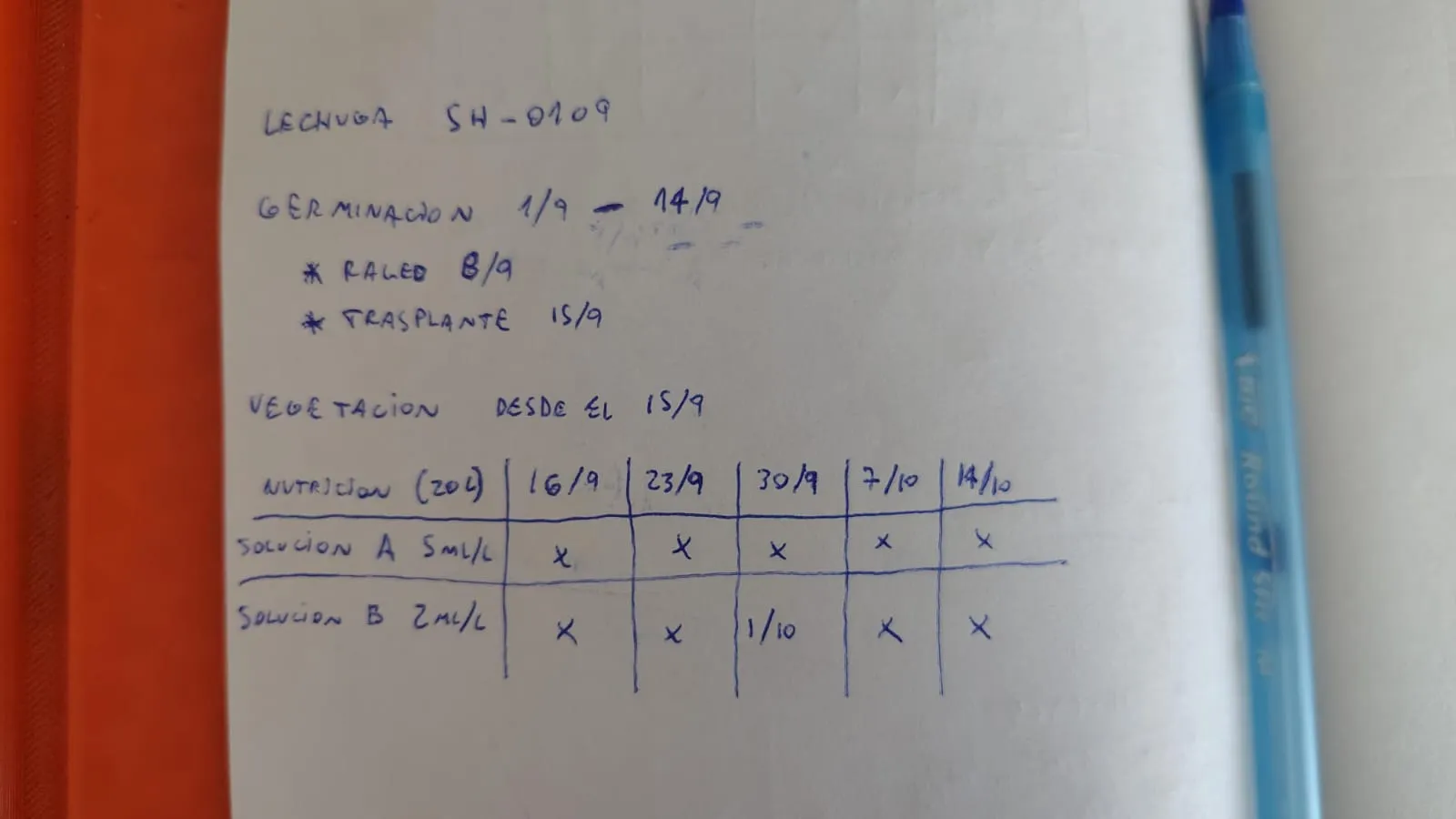
Instead of typing it, a photo of the page was taken and passed to the agent, which was already connected to the account through MCP.
Five steps on the account
- 01Check what was there
It queried the room, the lot and the supplies through MCP. The lot was there, with its 24 plants, but with no stages or tasks.
- 02Ask before entering
Two pieces of data were missing from the photo. It asked about them before recording anything.
- 03Rebuild the stages
It recorded Germination, closed, and Vegetative, running, in a single operation and with their real dates.
- 04Complete the supply catalog
It created Solution A and Solution B as nutrition supplies.
- 05Record each X
The thinning, the transplant and each X became completed tasks, with their planned date and the date they were done.
The questions of the second step were these:
- Whether germination had been in the same room: yes, in Sala hidro.
- How many seeds were sown per cube: two. The thinning left one per cube, so the lot stays at 24 plants.
The result was 12 tasks, the thinning and the transplant as Cultural practice and the ten solution applications as Nutrition, without typing any of them.
The 30/9 cell, in the platform
The 30/9 cell for Solution B has two dates: the column’s, the day it was planned, and the written one, the day it was done. In Growcast it stayed the same, with the planned date and the date it was completed.
| Supply | Dose | Applied volume | Planned | Completed |
|---|---|---|---|---|
| Solution A | 5 ml/L | 20 L | 30/09/2026 | 30/09/2026 |
| Solution B | 2 ml/L | 20 L | 30/09/2026 | 01/10/2026 |
The product, the dose, the volume and both dates came from the photo. So the delay is not lost: the task shows one day late and the lot’s report counts it.
The past, complete
The lot now has its history from sowing: germination, the thinning, the transplant and every week of nutrient solution, each task on the stage it was done in. That is what the MCP server adds: loading backwards. And since the room was already measuring, the variables of those weeks were in Growcast from the first day; what was missing was putting them in context.
From the lot, View report opens its report. Above the timeline, the Cycles lane marks each stage, and a dotted line crosses every variable where one hands over to the next: during germination the room was kept warm and humid, with VPD near 0.5 kPa so the seedlings do not dry out; from 15/9 temperature and humidity drop, VPD rises to between 0.6 and 1.2 kPa and CO₂ falls more by day, once the foliage draws more of it.
Lechuga SH-0109
Sep 1, 2026 – Oct 15, 2026
- Variety
- Butterhead lettuce
- Room
- Sala hidro
- Status
- Active
- Tasks
- 12/12
- Cycles
- 2
- Duration
- 45 days
Tasks 12
- Completed
- 12/12
- On time
- 92%
- Average delay
- 1 d
- Maximum delay
- 1 d
By type
| Type | Total | Completed | Pending |
|---|---|---|---|
| Nutrition | 10 | 10 | 0 |
| Cultural practice | 2 | 2 | 0 |
Daily activity
Consumption
Supplies
| Supply | Category | Applied volume | Events |
|---|---|---|---|
| Solution A | Nutrition | 100 L | 5 |
| Solution B | Nutrition | 100 L | 5 |
Timeline
Variables
| Variable | Min. | Avg. | Max. |
|---|---|---|---|
| Temperature | 17.9 °C | 21.8 °C | 24.5 °C |
| Humidity | 58.0 % RH | 68.4 % RH | 84.5 % RH |
| CO₂ | 419.0 ppm | 457.2 ppm | 506.0 ppm |
| VPD | 0.4 kPa | 0.8 kPa | 1.2 kPa |
Rules that do not change
- The agent works with the role of its account: what that account cannot do, neither can the agent.
- No data is made up: what is missing from the photo is asked before entering.
- Supplies are reused from the catalog; only the missing ones are created.
- Past stages are entered together, with their real dates, without overwriting the ones that already exist.
- Each task keeps its planned date and the date it was done, even when they differ.
Closing
- Growcast’s MCP server connects an AI agent to the account with a single address.
- A photo of the sheet is enough as a starting point.
- A lot that was already in Growcast gets back its stages and tasks from sowing.
- A task done late keeps its delay.
- The lot’s report shows the variables with the cycles on top, from the first day.
Traceability is useful when it is complete and can be consulted, not when it sits in a notebook.
The pieces that history goes into, varieties, lots, cycles and tasks, and how they tie together, are covered in order in the traceability from scratch note.
Drawn from the Growcast platform user manual. Values in the figures are illustrative.